By Usman hyder
How to Compress Images Without Losing Quality (Complete SEO & Performance Guide)
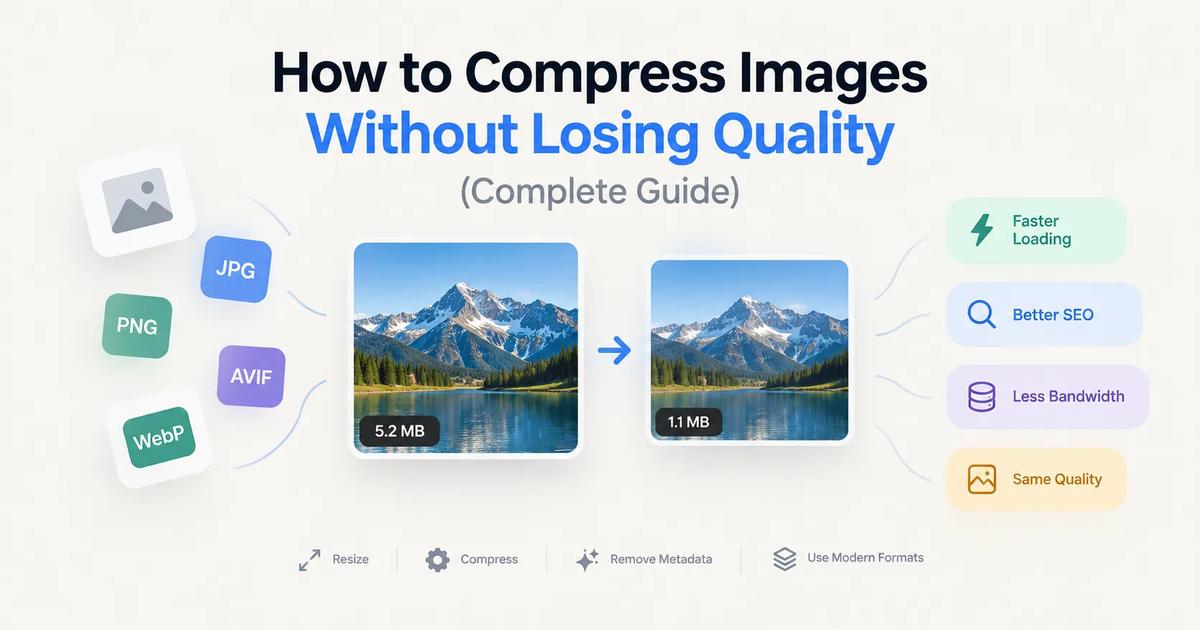
Large images are the number one culprit behind slow-loading websites. In today’s web environment, they don’t just consume storage and increase bandwidth costs—they directly damage your Core Web Vitals and drag down your search engine rankings.
With search engines and AI-driven search overviews heavily favoring lightning-fast, mobile-first experiences, optimizing your media is no longer optional. The good news? You don't have to sacrifice visual quality to achieve perfect page speed scores.
Modern image compression algorithms and next-gen formats can often cut image sizes by 70% or more while keeping them visually indistinguishable from the original. In this guide, you'll learn how image compression works, which modern formats to choose, and the exact strategies to optimize images for maximum SEO impact.
What Is Image Compression?
Image compression is the process of reducing an image's file size while preserving as much visual data as possible. Smaller image files allow browsers to render pages faster, reduce server load, and dramatically improve the overall user experience.
The ultimate goal of modern compression is finding the "sweet spot"—the exact point where file size is minimal, but the human eye cannot detect any loss in visual quality.
Why Image Compression Matters for SEO in 2026
Compressing images offers benefits far beyond saving disk space. It is directly tied to your website’s search visibility.
- Passing Core Web Vitals (LCP): Google uses Core Web Vitals as a major ranking factor. The Largest Contentful Paint (LCP) metric measures how fast the main content of your page loads—which is almost always an image. Compressed images are the fastest way to get your LCP under the recommended 2.5 seconds.
- AI Search & Visual Discovery: Search Generative Experiences (SGE) and AI search tools rely heavily on rich, fast-loading media to populate their visual answers. Optimized images are more likely to be crawled, understood, and featured.
- Mobile-First Indexing: Over 60% of all web traffic comes from mobile devices, often on cellular networks. Search engines evaluate your site based on its mobile performance. Smaller images mean a faster experience for mobile users.
- Lower Bounce Rates & Higher Conversions: Visitors abandon slow websites. E-commerce studies consistently show that pages loading in under 2 seconds have significantly higher conversion rates and better user engagement.
- Reduced Bandwidth Costs: Every megabyte downloaded by a visitor costs server resources. Compressing images slashes data transfer, lowering CDN and hosting bills for high-traffic sites.
How Image Compression Works
There are two main categories of image compression, alongside modern AI-assisted techniques.
Lossless Compression
Lossless compression reduces file size by reorganizing data efficiently without removing any actual pixel data. The original image can be perfectly reconstructed.
Best for: Logos, icons, charts, typography-heavy graphics, and medical imaging where zero data loss is acceptable.
Lossy Compression
Lossy compression permanently removes minor visual data—colors and details the human eye can't easily perceive—to achieve massive file size reductions.
Best for: Photographs, complex web images, product galleries, and social media content.
AI-Driven Compression (New)
Modern tools now use machine learning to analyze the content of an image, applying heavier compression to out-of-focus backgrounds while preserving crisp details on the main subject (like text or faces).
Which Image Format Should You Use?
The web has moved past the days of relying solely on JPEG and PNG. Here is the modern hierarchy of image formats:
AVIF (The New Standard)
Developed by the Alliance for Open Media, AVIF is the current gold standard for web images.
- Pros: Produces files up to 50% smaller than WebP and 70% smaller than JPEG with identical quality; supports transparency and HDR.
- Cons: Encoding takes slightly more processing power, though it is now supported across all major browsers (Chrome, Safari, Firefox, Edge).
WebP (The Reliable Fallback)
Created by Google, WebP is now universally supported and serves as an excellent baseline.
- Pros: Smaller files than JPEG/PNG, supports transparency, broad compatibility.
- Cons: Not quite as efficient as AVIF.
JPEG
The legacy format for photographs.
Role today: Use it strictly as a fallback for incredibly old browsers, or as a source file format before converting to AVIF/WebP.
PNG & SVG
- PNG: Use only when you need lossless transparency for complex graphics, though WebP/AVIF often handle this better now.
- SVG: The absolute best choice for vector graphics like logos, icons, and UI elements. SVGs are code, making them infinitely scalable and incredibly lightweight.
How to Compress Images Without Losing Quality (Best Practices)
1. Resize Dimensions and Use Responsive Images (srcset)
Don't serve a 4000-pixel-wide image to a smartphone screen. Before compressing, ensure your image dimensions match their display size.
- SEO Tip: Use the HTML srcset attribute. This allows you to upload multiple sizes of the same image, and the user's browser will automatically download the smallest version that fits their screen.
2. Choose Next-Gen Formats via <picture> Tags
Deliver the best format possible without breaking older browsers by using the HTML <picture> element:
3. Automate with Image CDNs
Instead of manually compressing every image, modern web development relies on Image CDNs (like Cloudinary, Cloudflare Image Resizing, or Imgix). You upload your high-quality original, and the CDN automatically compresses, resizes, and converts the image to AVIF/WebP on the fly based on the user's device.
4. Adjust Compression Settings Intelligently
If manually compressing, a quality setting between 75% and 80% usually provides the perfect intersection of tiny file size and indistinguishable visual quality for AVIF and WebP.
5. Clean Up Metadata (But Keep Copyrights)
Cameras attach EXIF data (GPS coordinates, camera model, shutter speed) to images, bloating the file size.
- SEO Tip: Strip unnecessary EXIF data to save kilobytes, but retain IPTC copyright metadata to protect your visual assets from being scraped uncredited by AI models.
6. Implement Native Lazy Loading
While not compression itself, adding loading="lazy" to your <img> tags tells the browser not to load images until the user scrolls down to them. This dramatically speeds up the initial page load and improves your Core Web Vitals.
Common Image Optimization Mistakes
- Relying on PNG for Photographs: PNGs are uncompressed by nature. A photograph saved as a PNG can be 5x larger than an AVIF version.
- Forgetting Alt Text: Search engines can't "see" your images perfectly. Missing alt text hurts accessibility (a11y) and strips away valuable keyword context for Image SEO.
- Compressing an Already Compressed Image: Running a JPEG through a compressor multiple times causes "artifacting" (blocky, blurry edges). Always compress from your original high-res source file.
- Chasing the Smallest Possible File: A 15 KB image is useless if it looks blurry and unprofessional. Prioritize visual integrity—compress until you notice a drop in quality, then dial it back one notch.
Frequently Asked Questions
- Does compressing images reduce quality?
Not if done correctly. Lossless compression preserves 100% of the data. Modern lossy compression (like AVIF at 80% quality) removes data mathematically, but the visual difference is virtually impossible for the human eye to detect. - Is AVIF better than WebP in 2026?
Yes. AVIF consistently produces much smaller file sizes with better color retention (especially in gradients and text) than WebP. With near-universal browser support today, AVIF should be your primary format. - Will image compression fix my Core Web Vitals?
It is usually the most impactful step. If your LCP (Largest Contentful Paint) is failing, optimizing the "hero" image at the top of your page by resizing, compressing, and preloading it will usually solve the issue.
Final Thoughts
Image compression is no longer just a server-maintenance task—it is a foundational pillar of modern Technical SEO.
By utilizing next-gen formats like AVIF, implementing responsive srcset delivery, and serving images through a modern CDN, you can drastically reduce file sizes without compromising visual quality. A few minutes spent optimizing your media pipeline will lead to faster loading pages, higher conversion rates, and a distinct advantage in search engine rankings.
Get WebPit for Mac — unlimited power, one‑time purchase
Batch processing · Watch folders · Menu bar agent · Clipboard conversion · Native speed